Sunday, November 16, 2008

Pat's Quick and Dirty Acer Aspire One Review


First Impressions
Build quality is very good. Seams are tight, and all the different components fit very well. The construction is light, but solid. The pearlescent white plastic behind the screen looks to belong to a more expensive device, and the materials look to be of a high standard. It’s easily the most good-looking netbook in my opinion, possibly tying with the HP mini-note 2133, which is very stylish, but loses points for its bulkiness. The battery fits flush into the battery compartment and the material matches the plastics furnishing the underside of the netbook, so the battery fits well with the overall aesthetics of the design.
Unfortunately however, its with the slotting of the battery into the compartment, and powering on of the device, that the great first impression I had dissipated. Like a beautiful girl who snores like 60 year old overweight man with sleep apnoea, the loud, incessant whine of the Aspire One’s CPU fan just ruins an otherwise perfect moment. Its drone is constant, with the fan activated as soon as the netbook is turned on, and remains on, even when the netbook is idle, occasionally increasing in pitch when the the device is put to use. I understand that this serves to keep the CPU cool, but having owned the first gen Asus EEE PC for over a year, along with a few full-sized laptops, I can honestly say that the noise coming out of the Acer is the loudest I’ve experienced from a laptop. Although it does blend in with ambient noise, during my testing in a quiet room, the noise was so noticeable that I had to turn it off only after 15 minutes or so of operation. I could imagine this noise making the user a target of annoyed looks in a quiet lecture theatre, or a study area.


But overlooking this point, I must say that the screen is gorgeous. The relatively low resolution (1024x600) is well complimented by the small screen size, which means that visually, the screen renders crisp images, with barely noticeable 'jaggies' or blurriness. The backlighting is also very good, with the lowest setting still throwing a nice amount of illumination to the screen. Despite the wide-screen view, websites are easy to navigate, with only downward scrolling needed.
The keyboard is a good size, with good-sized shift keys one either end (an oft ignored aspect by other netbook manufacturers). Keys are comfortable to type on, and with time (and not being a touch-typist) I reckon I could get quite fast on it, despite the smaller size. The keys are a bit squishy, with the keys being slow to spring back after being depressed, but in any case, the keys register accurately and without any lag.
Unfortunately, while I would consider the Aspire One’s keyboard to be one of the better netbook keyboards I have used, I have to say that the touchpad would have to be one of the worst. The rectangular touch pad consists of the touch surface flanked by the left and right buttons on the side, instead of underneath as with other touchpads. This caused all manner of frustration for me, since I am so accustomed to using touchpads one-handed (usually for invoking the keyboard shortcuts with my left hand, while operating the cursor with my right). First of all, left-clicking using the dedicated button required the dexterity of a surgeon who does finger-yoga...however I managed to get around this obstacle by simply tapping on the touchpad itself, which in itself was quite usable and accurate. However, right-clicking proved to be an insurmountable obstacle, since my hand almost had to approach the touchpad from the north-east to even get my thumb in position to click the right button. To add insult to injury, both mouse buttons sit flush with the chassis and required a pretty hefty push, which was not always possible from the angle of my thumb, making it difficult to highlight text accurately because I couldn't maintain sufficient pressure over the left button with my thumb alone, and overall slowed down the act of activating context specific menu's via right-clicking. I seriously wonder how this touchpad design got past user testing (if any).


Programs
Fortunately, crapware is kept to a minimum, with google desktop, mcafee antivirus, and a trial of microsoft office being the only ones I noticed, so kudos for Acer for realising that its not a good idea to bog the system down anymore than it already is. Perhaps the only criticism I have, is in comparison to the linux version, the XP variant is missing the office and other tools that are present, but that only really affects those that are completely new to computing, which arguably is not the target market for the XP variant. All in all, on the software side, Acer keeps the MS install of XP home edition free from clutter.


Performance
I won't really touch on this because I've decided really early on not to keep the device, so I'm reluctant to install any software, and there are several reviews on the One that have already covered this, so I'll skip it. I will say that wireless performance is more than adequate (it identified and logged on to my home wifi network with ease) and webpages rendered quickly. Youtube videos work fine in both windowed and full-screen modes but moving the mouse causes it to drop frames immediately, and having the CPU at just under 50% probably has something to do with it. Taken as an indicator, I don't think multi-tasking will be a strong-suit of the One, though really, the small screen would really make that difficult to begin with anyway.
Sound from the bottom-firing speakers are not the best, but also not the worst sounding I've experienced from a laptop - suffice it to say that having the One on your shoulder boom-box style won't really be viable (or realistic anyway) or being the source of music for your neighourhood block party.


Battery life
The included battery is a thin block which is almost the length of the netbook, approximately 1.5cm thick, and sits flush with the chassis. While this makes the whole package aethetically pleasing, it does place limits on the battery's capacity, which ends up being a relatively paltry 2200mAH. Translated to real world usage, this means 2hrs of work with the screen at the lowest setting, and wifi turned off. Acer's decision to skimp on battery in this way is disappointing, because it severely limits the capacity of the One to work as a mobile device. Maybe my idea of target market serviced by netbooks is incorrect, but I thought the aim of having such compact laptops was so that they can be used on the go, part of which includes use in scenarios where access to cabled power is not available ie lecture theatres, and cafe's. With the battery life as is, the One would just make two 1 hour lectures before needing a recharge, less if some of that time involves use of wifi.

On that note, charging takes about 1min/1% of battery life when the One is being used, so with the stock standard battery, approximately 1hr and 40min are required to charge the battery from 0 to full - not bad, but certainly means that for continuous all day use, you'll have to be spending most of your day being plugged in.


Final thoughts
During my brief time using the One, I tried my hardest to love the device, and there certainly was a lot to love: looks, build quality, and computing performance were either on par, or better than expected for the price. However the misgivings with this device were just too obvious, probably emphasised by the attention to detail in the other aspects, and were things that I could not come to terms with, such as battery life, and that ruddy CPU fan noise! Its such a shame that the great detail to the design and execution of the chassis didn't extend to making a larger space for the battery, or having enough space to have a touchpad with the buttons in a more familiar position. To end on a positive note, I think that Acer has shown with the One that they are serious about their entry in the increasingly more crowded netbook market, and I hope that gen 2 of the One goes further in enhancing the usability of the device.

Friday, November 07, 2008

Living without a laptop for 5 days - not bad at all.

I reckon that its a pretty exciting time to be a geek - due to the rapid advances in battery and radio technology, being attached to a computer or the web no longer requires one to be sitting at a desk. Furthermore, computers themselves are getting smaller, and are now available in form-factors such as smartphones and mp3 players.


The no laptop challenge

With the smartphones and ipods being such capable internet devices, and with the majority of my web surfing needs not extending beyond basic websurfing and downloading the occassional podcast, I thought I'd set myself the challenge of leaving my laptop at home and relying on my smartphone and ipod during a 5 day conference in Adelaide earlier this year. So the first device I decided to bring was my smartphone, since a phone would be a must for safety as well as enabling contact with my work colleagues which were arriving on different flights. The phone also provided a source of 'reliable' internet access (based on the coverage maps of my provider), which I could use anywhere, and more importantly, at any time. The decision for leaving the laptop at home was made even easier by the fact that I didnt have to present anything this time around, so there really wasn't a need for the computing power of a full-sized computer. Sure my smartphone had powerpoint viewing software, and I could simply keep a copy of my talk on a usb stick, but I tend to be a little paranoid about things like presentations as it is without trying to add another variable to the mix. Anyway, in the end I decided to keep my gadget count to two - the smartphone and the ipod touch, both capable and extremely pocketable devices.


So armed with my smartphone (the Windows Mobile 6 based Dopod 838 at the time) and the first gen ipod touch, I headed off to the airport.


First off, I cannot tell you how liberating it is to not have to carry more than one bag into the plane, nor how much quicker it is to go through the baggage check - I think I even chuckled quietly to myself while watching the people around me trying to juggle their multiple bags in order to take out their laptops to place on the conveyor belts for scanning.

Also, this was around the ti,e when the airports had so many different rules on what you could and could not bring on board the plane with you, and I was adamant that I didn't want to have to check in any luggage, especially if my laptop was going to be in it. It turned out later that my worries were unfounded, but it was too late to do anything about it now.


Past the gates, I turned on my phone, and fired off a few work emails and a couple of tweets as I made my way down to the the boarding area, grabbing a slightly overpriced coffee and donut while browsing the news headlines on smh.com.au...ah, the wonders of mobile internet. as I walk past some internet kiosks littered around the airport terminals, and the people hogging access to them, I had another smug chuckle, then had a quick virtual window shop at some online stores. when i got to the terminal, I thought I'd save some of my mobile internet quota for when I actually got to Adelaide and had a quick war-drive for any free wifi...unfortunately there was only a for-pay hotspot provided by the Airport, so it was straight back on the mobile internet. When it came time to board, I just got up and continued surfing until I handed the boarding pass to the nice attendant, put the phone in my pocket and walked the ramp and boarded the plane without skipping a beat. Once my bag was in the overhead locker, I settled down on my seat, fired a couple of sms's, looked at what was happening on my twitter feed, and feeling so smug about the whole thing that I would probably punch myself in the face if I ever saw me. When it was time, I activated flight mode on my phone, and got my headphones ready for when we were in the air, and were allowed to use electronic devices again. This time, the ipod was my source of entertainment , which contained about 3 hours worth of podcasts that I'd downloaded over the air via wifi, thanks to an app called mobilecast (thanks to jailbreaking).


Once I touched down in Adelaide and got to the conference floor, the phone came in handy for the periods when I was feeling bored and a little anti-social, and in the evening, the free google maps app was handy for navigating around an unfamiliar city, using cell-tower triangulation to approximate my location, since my phone did not have gps. I think even I was amazed at how capable the Dopod was at fulfilling all of my computing requirements, including downloading a couple of podcasts over the mobile internet when I settled in at the motel.


at this point I should say that my use of the smartphone as a source of internet access over the ipod touch was less due to usability and interface factors, than it is by the fact that there is absolutely no free wifi to be had where I needed it to be in Adelaide...I probably could have looked a little harder, but because I had already signed-up and am paying for mobile internet, my laziness kicked, and I defaulted to using that full time. A few months later, I came across some software that would allow a windows mobile phone to act as a wifi hotspot, which would effectively allowed me to tether the touch to my phone...unfortunately I did discover this after the fact, and would probably just result in draining both my phone and ipod batteries quicker anyway, but good to know that its out there. Incidentally, I now have the symbian version of that program running on my current smartphone (the E71), and though i rarely use it, it does come in handy for when O need to access sites that dont work on the E71's in built browser, like hotmail for instance.


Anyhoo, for 5 straight days and despite being in a new city, I remained connected to the internet where I want, and when I want, and though I had to put up with starring at the world wide web through a small 2'8 inch screen, there was not a point during the whole time when I was lamenting my decision to forego the laptop. Can I also say that being laptop free allowed me to travel lighter during the conference since I'm too paranoid to leave anything valuable in my hotel room, which left more space in my schwag bag for, well, shwag of course :)


So as an epilogue to this post, I find myself increasingly turning to my smartphone and ipod touch when seeking to access the internet since that little experiment, and I find that my laptop is spending more and more time on my desk, and has been relegated to performing desktop tasks like video encoding, image manipulation and word processing. I probably should note at this point that this blogpost was written entirely from my E71 while lying in bed :), though I did upload it (and performed some minor changes) on a full-sized laptop.

Sunday, September 07, 2008

Nokia E71 Review part 1: Unboxing photos

Okay, so technically this doesn't really count as a review since I'm only showing unboxing photos, but in the weird and wonderful way that my brain works, I've managed to write the second part of the review (camera performance) first, so I needed something to slot in as post to introduce the fact that I'm reviewing the E71.

For the sake of full disclosure, I paid for this device with my own money, having researched the device extensively for the past few days before I pulled the trigger, so if the review ends up a bit gushy, then its probably me trying to justify the purchase. Also, I'm not a professional blogger, or a professional anything that has to do with publishing in a format for 'normal' people to read, so my sentences will be convoluted and not properly formatted, so bear with me. Worse comes to worse, just look at the photos :) And awayyyy we go!


Nokia E71 review part 2: Camera performance

In this second part of my E71 review, I take a look at the camera performance, but not only as a device for taking happy snaps, but in its ability to work as a productivity tool.

Camera

The camera has a 3.2MP sensor, which doesn't really mean anything to me, since its not any carl zeiss optics, but it does make the images more usable when viewing on the device, or on the web. What I do like is that the camera has auto-focus, and what's more interesting, is that you don't necessarily have to use it. When you activate the camera, you can immediately take a photo by pressing the enter button in the middle of the direction pad – lag using this method fairly good, but don't except to catch any good photos of hyperactive pets or other fast-moving objects with this thing. However, if you want the camera to focus, you press the “T” button on the QWERTY thumboard, and the autofocus attempts to lock focus. Now I haven't tried this for far away subjects, but I find that the best implementation of cameras with a focusing ability is for taking close-up/macro images.

Now I know that comparing the performance of a chintzy, strapped on camera in a smartphone to that of a dedicated camera with proper optics is a bit unfair, but I really wanted to compare the feature of the E71's camera that I was most excited with, namely the autofocus.

But looking at E71's general performance, we can see the images have a definite blue cast (which I find to be a symptom of Nokia smartphones that aren't part of the N95 series), and items in bright sun are overexposed when you let the E71 control exposure (Fig 1). But with a slew of manual settings you can fiddle with (exposure compensation, white balance, and scene modes), you might be able to get a usable image for web use.


Figure 1: General camera performance


Now, as a macro-geek and information hoarder, I'm border-line obsessed with taking macro photos, as well as having electronic versions of hardcopy texts and whatnot. What I was hoping with the E71 is that the macro ability is good enough for me to jot things down on random pieces of paper, then taking a photo of it for storage on the E71. I am happy to say that in both scenarios, the E71's camera does a competent job.

Ignoring the blue cast of the pictures, we can see that in the two macro images I've taken, the sharpness in the E71 images aren't too bad, and doesn't seem to lag that far behind the dedicated camera in terms of autofocus ability. Note that for the sample images below (Fig 2) that I've taken a 500x500 pixel crop of the original images from the two devices, so the sensor MP differences are controlled for.


Figure 2: Comparing Macro capability of E71


In terms of taking photos of text, there is an obvious limit on how much you can fit in the one image, simply owing to the limits of the 3.2MP sensor. Another important factor is getting enough light onto the subject, in order to get quick enough shutter speeds to take care of camera-shake. But again, a competent effort that's good enough to make the camera useful as a tool. Again, examples are below (Fig. 3 for a closeup of 12point font, and Fig. 4 for an image taken of an A4 sized page).


Figure 3: Close-up of 12 point font


Figure 4: Macro image of an A4 page


Friday, May 23, 2008

Mini laptop anyone?

Are you a part-time roadwarrior that has to give a presentation interstate at a conference, and would rather not have to bring your big-ass, everything-but-the-kitchen-sink, weighs-a-freaking-tonne desktop replacement? Then the Asus EEE PC might just be what you need. And at the moment, Penta Computers, which has a brick and mortar shopfront at Ultimo, is selling the EEE 4G (900Mhz celeron processor, 512Mb RAM, 4Gb SSD, Xandros OS) for $371, which is a bargain considering that they originally cost $500 when they launched in Australia about 6 months ago, and are still being sold near the original price at the big box stores (like Officeworks, Myer and Harvey Norman). A version with XP pre-installed will cost $108 extra, unless you're ok with a green coloured one, which is bizarrely only $32 more.

At first blush, the EEE might seem too much like a kids computer, but when you look past the 'kid/n00b-friendly' interface of the reworked Xandros Linux OS, you'll see that you're actually getting quite a lot for something that costs just a bit more than a PDA/smartphone, but is much more capable. Its has an ethernet port for a start, which is very handy for the times when you only have cable access to a network, a VGA-out port for outputting to a bigger screen or onto a projector set-up, and three USB host ports, which at the very least, can power some peripherals.
Just add a monitor, a USB keyboard and mouse (the supplied keyboard and touchpad are a bit cramped), and an external USB HD and you've almost got yourself a basic, but capable desktop to work with. On the go, the Asus can perform adequately with wifi on for approximately 3 hours, which is enough to get some emails checked, get some surfing done, and maybe review and edit some office documents when you have some free time. And to think, a few years ago, an ultraportable laptop that is not too dissimilar from the EEE specs would have set you back a few thousand dollars...

PS: If you think the EEE prices are cheap now, you may be able to get an even cheaper price in a few months, when the second iteration of the Asus EEE PC arrives (I'd like to say in Q3 08, but I have nothing to back that up), which has more screen real estate (9 inches, 1024x600), more memory (1Gb) and more SSD space (12-20Gb)...of course it may be the case that the second gen (dubbed the EEE-900) might be more to your liking, so the choice is yours.

For all y'all who already have an iPhone...

...and where after a case, brick and mortar retailer Dick Smith Electronics are already selling iPhone cases (from leather flippy ones to reflective and clear hard cases) even before the iPhone has been launched officially here in Australia.

Not having an iPhone myself, I can't really make any recommendations with regards to cases for it, but as an iPod Touch user, I am a fan of the DLO JamJacket with 'cable management'. Basically, the cable management consists of some extra silicon jutting out of the back of the case where you can wind your headphones when you're not using them, and even has little holes that fit the headphone 'heads' and the jack...genius! Having said that, having all that junk jutting out the back of your otherwise wafer-thin (Monty Python reference) iPod does look a bit dodge at first, but the utility is worth it in my opinion.

I might post some piccies of the DLO jacket (which was a birthday present btw, and not a review product that was sent to me) if anyone cares.

Also, I haven't really done much research if the DLO case can be had for cheaper at another store, so it may well be cheaper elsewhere.

Thursday, May 22, 2008

Cheap external storage anyone?

Officeworks is offering a 1Tb external HD for $249...which would be awesome, except I had just previously purchased the exact same product for $299 less than a month ago!!! Anyhoo, my loss is your gain (if you were shopping around for some storage)...backup early and often people!

Trying something new

Having a chat to a professional blogger at STUB (shoutout to Nareev) got me thinking that maybe I should make my blog a bit more useful for people, and maybe eventually people will actually have a reason to read it.

Anyhoo, I was thinking of ways I can help people, and I came upon the idea of pointing out tech bargains that I spot here and there. I mean, I tend to window shop on the interwebs during my lunch breaks anyway, and this way my time-wasting exercise might be helpful. Let's see how we go, eh?

Searching online catalogues....now, errr, tomorrow (I am le tired)

Sunday, March 25, 2007

and now for something different


Sorry if that was hard to read - I was just trying out 'writing' on my blog.
ps:contrary to what I wrote on the post, I had to use the desktop to upload the text - it sucks that many webpages don't cater for the stripped down web browsers in pdas :(

Sunday, March 18, 2007

yeah, tx1000 still sucks

So last post, I was bitching about how crappy the tx1000 touchscreen was, but I wasn't quite ready to give up on it just yet. So I went to another store (same franchise, Harvey Norman), seeing whether I get a different experience. Unfortunately, it wasn't the case - even the salesman ws telling me that you have to really dig the pen in to write on it...damn.

I think I'll just have to look elsewhere for my touchscreen based computing needs.

Thursday, March 15, 2007

TX1000 - touchscreen? more like strong-sharp-forcescreen!

To anyone that cares, I've recently been shopping around for a new laptop. To be honest, my 2 year old celeron laptop, while bulky and has dismal (1hr) battery life, is doing well in serving all my computing needs (see last post)...so upgrading is not really essential.

Specifically, I've been indulging the thought of getting into UMPC's and other touchscreen based computers for use as my primary computer - I've been a pda person for a few years now (guess what I'm writing this blog post on?), and thought that having that experience on a full fledged pc would be cool, since I wouldn't have to sit down and prop my computer against a lap/table to use it.

Enter the hp tx1000, a convertible tablet pc, with a decent processor (2Ghz AMD turion x2), and a touchscreen instead of an active digitizer. I fell in love: this could well be my ultimate device. So being the excited geek that I am, started researching reviews. The results were mixed - people complained of weight, performance (speed and battery life), and then there was the touchscreen. I was so suprised when people kept talking about how much harder it was to ink on the touchscreen, and made a big deal about needing to keep the pen on the touchscreen for the whole penstroke...frankly, I was confused - I never thought that was a big deal - I mean, if you write with a pen, you have to keep the pen in contact with the paper for the whole penstroke right? I was starting to think that the reviewers might just have been used to active digitizers.

Anyhoo, I wasn't perturbed - though I was concerned about their comments, and thought I'd wait until I can try one out at a brick and mortar store before I take the plunge.

So imagine my excitement when I went to a store today (Harvey Norman for the Aussies reading this) and there it was. It looked amazing - the curved edges, the recessed trackpad, the small form factor - I think I almost ran to the display! I tested the swivel action, and the screen (some reviewers said it was grainy due to the digitizer that had to be overlayed onto the lcd - it was but not an issue for me)...so far so good...then my hopes came all crashing down when it came to using the touchscreen. It was easy enough to tap things, though I immediately noticed how much more pressure it required to get a response...then I tried to write using the touch input panel (TIP). Disaster! In order to make my penstrokes register, I was almost scraping my pda stylus against the screen (and it didn't help that the screen itself was not slick, and was catching the stylus tip)... I thought, 'any more of this, and I'll be scratching marks onto the screen!'. So as I left the store, I was annoyed at how such a cool device could be let down by such poor implementation of the touch screen...I even came back a few minutes later to see if there was a way to increase the touchscreen sensitivity, but I didn't find any (anyone know if there is?)....why hp, WHY??? Now I'm starting to worry if this touchscreen 'insensitivity' happens on the UMPC's as well! Anyhoo, the search continues...sigh.

Thursday, March 01, 2007

Laptop hunting

Hey all. The last few weeks have seen me scouring all over the net and on foot, searching for a new laptop to replace the one already have. There's nothing wrong with my current laptop - except for maybe the inadequate battery life, and maybe its heft - I just thought that it was time to see what I can replace it with. So off I went to research the current laptop offerings, and got bombarded with "core2duo" this, and "aeroglass" that... In the end, I was paralyzed with indecision - the new Microsoft operating system had also just started shipping with new laptops, but the response have been mixed. Indeed, do I even really need a new computer?

As a scientist, part of my job involves taking pictures of cells under a microscope. Now, I had just started working at a new place, and they use a digtal slr ie. something expensive and unfamiliar. Unfortunately, I'm a point-and-shoot guy at heart, and though I do like to dabble with the settings on my own digital camera, this was for work, and I didn't want to waste any time fiddling with settings. So I snapped away, checking the images briefly (on a teeny tiny 1.5 inch screen - way too small for me), and loaded them up on my laptop. Unfortunately, it seems that the LCD backlight on the camera was cranked way up, coz on my laptop, everything was severely underexposed. Crap! I had two options: take the photos again, but trying different settings (too fiddly), or I could try and boost the brightness using an image editing program (bingo!). Long story short, my 2 year old, celeron 1.5Ghz laptop with 768Mb of RAM and 40Gb HD performed like a star. Multiple layers, filters, having up to 20 or so images open (though just at 0.5Mb each pic) - there was no discernable lag, no crashing, no weird results. Then I also remembered that when I went on a roadtrip with some friends, I used the same laptop to download the video from my camcorder (via firewire), create a roadtrip video (with live preview activated), added a soundtrack, and played it in front of everyone that very night!

In the end, my laptop might look as sexy as a grey paving tile (and look/weigh like one), but as much as I'd like to find fault in it (to justify a replacement), I couldn't deny that it was a solid performer. Hell, even with intel integrated graphics, I can play World of Warcraft and Freedom Force (a very cool game, I encourage everyone to check it out), record, edit and encode HDTV (with my HDTV adapter), and create a dual monitor setup by outputing simulatenously to an external monitor!

So this is my advice to anyone contemplating a laptop/portable computer purchase: Laptops may not be created equal, but unlike what the manufacturers would have you believe, it doesn't necessarily mean that you won't be happy with anything less than the latest and greatest. Its not all about clock speed, especially with laptops. Battery life, portability and flexibility should definitely be considered, as well as the cost of extras, such as accessories, and extended warranties.

Based on those criteria, I reckon that my next laptop won't be a laptop at all, but an ultra mobile pc (UMPC) . In particular, the Asus R2H has caught my eye. At the moment I'm still researching how this device will perform (at $1850AU, I wouldn't want to end up with something I won't use) - I may even wait a little, to see if the price goes down a bit more, and maybe wait till it ships with Vista. Sure, I could upgrade it myself, but I'd rather leave it to the experts and not have to scour the net for device drivers - Kevin Tofel, I am not. Til then, I'll try to make do with my laptop as my primary computer, and use my pdas (hp ipaq h2210 with wifi sdio card and rx1950) for my mobile computing needs.

Sunday, December 10, 2006

Widescreen on a small screen: Creative Zen W


:D Purty ain't it?! Much bigger screen than the vision M, that's for sure (4.3 inch widescreen vs 2.5 inch) .

Costs the same as the CZVM 60Gb ($479), with half the capacity...but I think the 2x bigger screen, included A/V cable and ac adapter ($29 and $59 sold separately) justifies the price. No usb host, which bummed me out a bit, but it does have a CF slot, and a multi-card adapter available as an option, so it might still be ok for storing my pics on holidays.

Have to say that what convinced me to stick with Creative players is the included software - very user friendly, and converts video formats that aren't compatible, like all those vidcasts that are in m4v (ie. iPod format) that are available on the net, and the ones that come out of my digital camera (.mov format).

Its too big to be pocketable, which is fine since its got a huge screen and a spinning HD that wouldn't survive two days in my pocket anyway, so a bag would be a must to carry this around. Speaking of bags, the drawstring pouch that was provided as a case was pretty lame and provides crap all protection against anything but dust, but I love how the W's chassis is made of a matte, faux brushed metal finish that resists fingerprints and scratches...something that the CZVM sorely needs.

This ones a keeper.

Sunday, December 03, 2006

The creative zen vision m has left the building

alas, the honeymoon is over. I returned the Creative Zen Vision M (CZVM) today - thank God for generous return policies!
The tragedy is, the CZVH would have been my perfect multimedia companion, but I just found too many negatives that I know will eventually frustrate me to no end.

First and foremost, the screen is too glossy! It was so bad that my eyes were constantly refocussing to my reflection, giving me a headache after only a few minutes of watching. And what was even more annoying was that the rest of the body was so bloody reflective as well! Sure, it makes it look pretty, but I need something that is functional, and this wasn't working for me.

Finally, though the build quality is pretty good, I felt like I can't comfortably walk around the place with this thing in my pocket - the front is just too scratch prone. Getting it out of the packaging already produced some micro-scratches, and don't get me started about the dodgy drawstring bag that was provided as a case! Also, being my first experience with a hardrive based pocketable device, feeling the hard drive spinning in use alerted me to the fact that carrying this thing around would require special care. I've been spoilt by flash based memory in all my other portable gadgets (PDA's, phones, mp3 players, even cameras), and frankly I'd be too obsessively paranoid about crashing the HD carrying this around in my pocket.

So its with a heavy heart that I drove to the store and returned the CZVM, knowing that apart from those few complaints, that it is a very innovate and worthwhile device. I'll still write up my impressions on it, though obviously I won't be able to tell u anything about the battery life (apart from how long it takes to trickle charge via usb), but hopefully it'll help others decide whether the CZVM is right for them.

Thursday, November 30, 2006

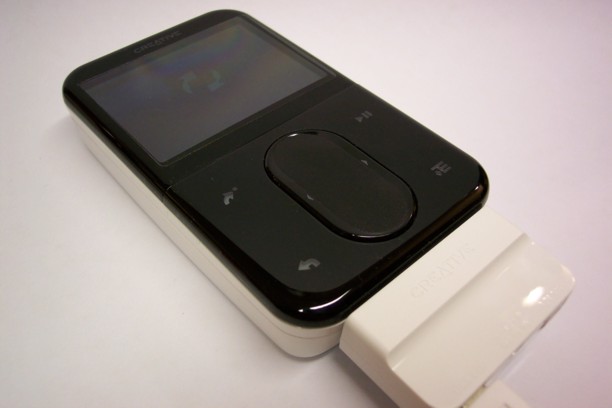
May I present: The creative zen vision M 60Gb!


Just got my hot little hands on a new Creative Zen Vision M (CZVM) :D Its a kick-ass mp3/wma/divx/xvid/mpeg/wmv player, and usb host feature built-in!

What is this usb host thing, you ask? Well, it means that you can connect a usb drive or camera to the CZVM (just as you would with a computer) and download the files from the drive/camera to it! No more running out of memory for all your piccies and vids (which happens all too often to me on holidays), and it has a nice 2.5' inch screen to view those downloaded images as well (which is a bit bigger than any of the screens on my cameras). On a cost per Gb comparison, $479 for 60Gb (just under $8 per Gb) vs $75 for a 2 Gb SD card ($37.50 per Gb), the CZVM is a darn good deal in my book. Having said that, there are a few things I don't like about the player, but I'll leave that for my full review, coming soon!

Stay tuned!

Pat
ps:That's a pic of my CZVM 60Gb charging up - that white thing attached to it is the multi-connector dongle (hehe, 'dongle'...)

Thursday, July 13, 2006

New pics on flick!

Just a quick post to say that there are new pics on my flickr album - that's going to be the place for my photos to go while MSN spaces continues to not let me upload my photos on my other blog. So just click on the link to the right of this page for the pics...and don't be afraid to leave a comment :)

Take it easy,
Pat

Sunday, July 02, 2006

I love redundancy...

..at least with my gadgets. I've just bought a firewire pc card today - its a long story as to how this ties into redundancy, but its got to do with the fact that my laptop is still in the shop (hopefully getting fixed), and until today, I had no way to upload the videos on my minidv to a computer. This is an unusual situation for me since I'm too much of an impatient, paranoid freak about everything that I am hardly without access to a backup of any of my devices...and because I'm not made of money, this usually means that I purposely buy things that can perform double duty in a pinch.

maybe next post, I'll share all my toys with you and what I used them for :)

Watch pat hanging out on youtube

http://www.youtube.com/watch?v=3lK7bbNc4Iw

This is what I've been doing every tuesday night (and I plan to continue
doing) for the last six months...and I think one of the funny things is the
fact that I'm actually scared of heights (though I subscribe to the 'don't
look down' philosophy, and its been working well for me so far)

Pat
ps: I cheated with this post and did it with a desktop (considering that I
had to upload the video on youtube first); anyhoo, hope you enjoy it.

Saturday, May 27, 2006

hehe, ok, so I CAN post photos...wooo!

ok, the photo below is of my friend James from work (and his oversized mug)...I'm on my sister's laptop at the moment, since my own Compaq Presario 2200 piece of Sh_t suddenly decided that it doesn't want to recognise my wireless card - the same one that is built in there, and that has been working fairly well for over a year and a half (I'll do more complaining in another post). And all of that was to explain my photo choice, since I don't have access to many of my photos at the moment. Hmmm, I'm being unusually productive for a saturday morning...better watch some tv and scratch my ass for a bit to compensate :)